Welcome to the Comms Platform documentation page. Your go-to resource for mastering our SMS platform! Here, you’ll find detailed guides, API references, and best practices to help you integrate, configure, and optimise your messaging solutions.
Whether you’re setting up your first campaign or building advanced workflows, our documentation provides clear, step-by-step instructions to ensure a seamless experience.
Get started quickly and unlock the full potential of your SMS platform—your communication success starts here!
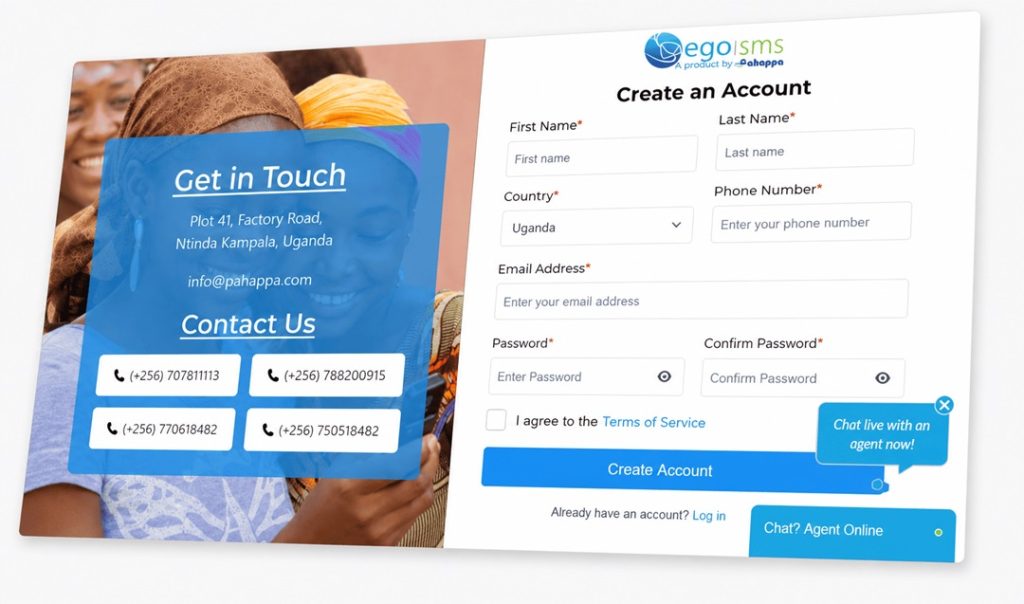
Once the page loads, click on the “Create Account” button.
3
Fill in the Account Creation Form
Provide all required details in the registration form, including your name, email, and password
4
Agree to the Terms of Service
Review our Terms and Conditions and check the box to agree before proceeding.
5
Click Submit Button
Once all details are filled, click the submit button to complete the registration.
Verify Your Account
1
Check Your Email
An email will be sent to the address you provided during registration. Look for a verification message.
2
Verify Your Account
Inside the email, you will find a verification link. Copy / Click on the link to verify your account. The link will direct you to a page where you need to enter a verification code. This code is included in the link or the email.
If you don’t see the email, check your spam or junk folder.
3
Complete Verification
Enter the provided code in the designed field on the verification page.
4
8
2
|
4
4
4
Login
Once your account has been successfully verified, you can log in using the email and password you created.
5
Account Selection
Upon successful login, you will be directed to a page displaying all your user accounts, including your Personal Account and any associated Channels. Identify the account you wish to access and click the “Continue> button next to it.